How much is your data worth to you?
All of those documents, pictures, vacation videos, cat videos, video games and so on. I could bet somewhere in that data, there would be something precious to you. Something that money couldn’t put a figure to.
That is exactly what hackers are hoping for when they carry out ransomware attacks. Ransomware is a form of malware made to encrypt files so they are unusable with the promise of restoring them upon receiving payment.
This type of attack isn’t new with the first variants of ransomware existing as late as the 80’s. Modern payment methods and anonymous currencies (cryptocurrencies) have aided in the overall rise of ransomware attacks worldwide.
How does it happen?
In the past 2-3 years of my line of work I have seen the delivery of ransomware vary. Most often it is delivered through spam emails and malicious attachments/urls. This method remains popular as a delivery system for most types of malware but can be mixed with social engineering, worm-like network spreading, vulnerability exploitation (see wannacry) and more.
In rarer circumstances I have seen unsecured RDP connections being levied to drop/run ransomware live onto terminal servers. A very popular delivery method is through malicious pop-ups and compromised advertising networks (also known as malvertising). Malwarebytes wrote a great article in 2016 detailing how both attacks can be used in conjunction for widespread infection.
What can you do?
Prepare.
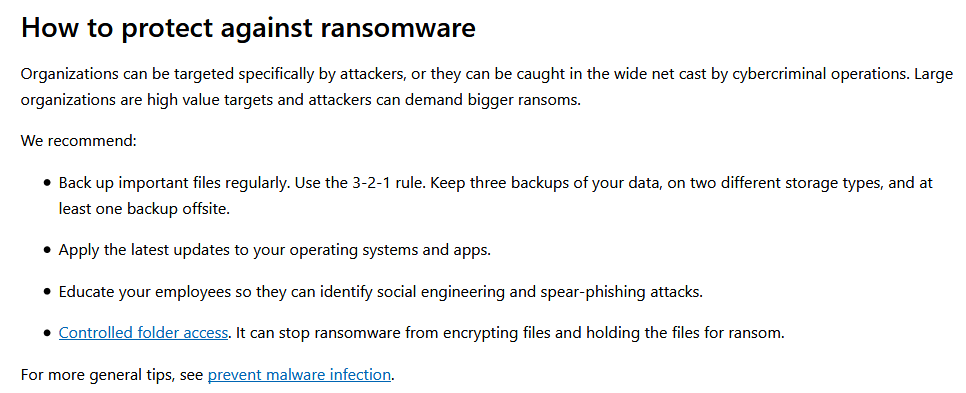
If you have data you are unwilling to lose whether at work or on your personal machine, make backups.
I cannot stress this enough: Make Backups.
Often when ransomware is ran, it is done so by the end victim unknowingly so the malware runs with the same level of access/privilege on the machine as the user. It is unlikely that decryption tools for the particular strain of ransomware you might be infected with will work and antivirus systems cannot be 100% full proof (especially if the infection is self inflicted).
In the worst situation, restoring to a backup may simply be a trade off of losing some newer data in exchange for everything you currently have. The guidance in regards to actually paying the ransoms is simple: Don’t
Due to how ransomware can spread, deeply embed itself and self replicate to remain alive I generally do not even attempt “fixing” or “cleaning” a ransomed machine in such a state. There is no guarantee of removal and it isn’t impossible to package such malware with further trojans or remote functions, so if you have a hard drive that is encrypted simply reformat it and start a fresh.
The only other guidance on this topic are further preventative measures such as security awareness training. If in doubt, ask yourself:
“Do I know this person?”
“Is this email for me?”
“Does this sound like someone I speak to?”
“Was this site legitimate?”
“Did I choose for this file to run?
Now if the inevitable has happened and you have no other means to retrieve your data, there are lists of decryptors made for various strains of ransomware. These are often made when the encryption keys are recovered when hackers are arrested/sentenced or through the hardwork of security firms cracking it, below are just a few:
- https://heimdalsecurity.com/blog/ransomware-decryption-tools/
- https://www.mdsny.com/decryption-tools/
- https://success.trendmicro.com/solution/1114221-downloading-and-using-the-trend-micro-ransomware-file-decryptor
- https://www.mcafee.com/enterprise/en-gb/downloads/free-tools/ransomware-decryption.html
- https://noransom.kaspersky.com/
- https://www.avg.com/en-gb/ransomware-decryption-tools
 Fighting the endless fire